
Gaming can be a blast but let’s face it: discomfort can ruin the fun. Ever felt that nagging pain in your back after hours of gameplay? Or maybe those annoying distractions make it hard to focus?
These are common issues many gamers face. I know because I’ve been there.
Creating an ideal gaming atmosphere isn’t just a luxury. It’s a necessity for serious gamers who want to boost their experiences. I’ve spent years optimizing my own gaming setups, learning the ins and outs of gaming setup comfort.
Trust me, I’ve experimented with different chairs, lighting, and sound setups. I know what works and what doesn’t. You can create a space that keeps you comfortable for those long sessions.
In this article, I’ll share actionable steps to improve your gaming environment. You’ll learn how to address physical strain and eliminate distractions. The goal is to help you game longer and better.
If you want to up your gaming game, you’re in the right place. I’m here to guide you through the process. Let’s dive in and transform your setup into a comfort zone you’ll love.
Ergonomics in Gaming: Comfort is Key
Let’s talk about ergonomics. It’s basically the science of making your environment work with your body. In gaming, that means setting up your space to reduce strain and keep you comfortable.
Ever noticed how your back starts hurting after a couple of hours in your chair? That’s poor ergonomics at work. Over time, bad setups can mess with your health.
Wrist pain, eye strain, even headaches (it’s) a real list of problems. But let’s be honest, they also hit your gaming performance. How are you supposed to focus when your neck feels like it’s in a vice?
So, what’s the fix? Simple tweaks make a world of difference. Adjust your chair so your feet are flat on the ground.
Your monitor should be at eye level. Not too close, not too far. Think Goldilocks, but for screens.
Now, for a quick checklist: chair height? Check. Monitor position?
Check. Keyboard and mouse within easy reach? Check.
Sure, it sounds basic, but I promise it’s not boring. You don’t want to end up feeling like an old person every time you log off. And here’s a thought.
Taking breaks matters. Seriously, you can read more about the importance of gaming breaks.
The bottom line is this: gaming setup comfort matters a lot more than most people think. Get it wrong, and you’ll know soon enough. Get it right, and does your body thank you, but your leaderboard ranking might, too.
Want better focus? Skip the fancy equipment for now. Start with ergonomics.
That’s the real game-changer.
Gaming Setup Comfort: Make Your Space Work for You
So, you’ve got your gaming gear, but is your setup really comfortable? Let’s get into it. Your gaming space layout can make or break your experience.
Ever tried focusing with clutter everywhere? It’s a nightmare. I’ve learned that organizing your space can boost concentration.
Keep your gaming area clean and free from distractions. Trust me, a clear desk equals a clear mind.
Lighting is another biggie. Bad lighting can strain your eyes faster than you’d think. You don’t want to end up squinting at your screen, right?
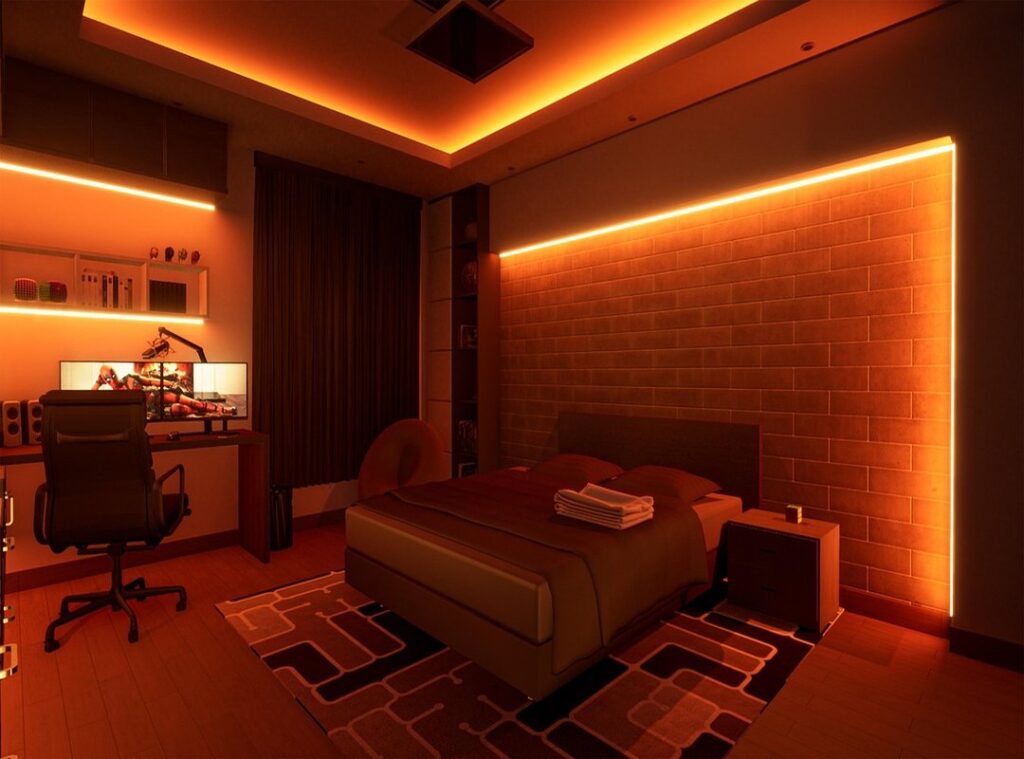
I suggest using soft, ambient lights. They’re easier on the eyes and keep the focus on your game. You could even go for some LED strips for a bit of flair.
Just make sure it’s not blinding.
Now, let’s talk sound. You need an immersive experience, not your neighbor’s TV blaring through the walls. Soundproofing can be a game-changer.
Use thick curtains or even some foam panels. It’s a simple trick that can raise your gaming to another level. Who needs noise when you’re trying to concentrate?
And hey, don’t underestimate the power of a comfortable chair. It’s not just about looking cool (though that’s a bonus). A good chair supports your back, which is key for those long sessions.
You’ll thank yourself later.
In the end, gaming setup comfort isn’t just a luxury. It’s a necessity for serious gamers. So, tweak your setup and see how much better it feels.
Your eyes, ears, and back will thank you.
Gear Up for Comfort: The Winning Setup
When it comes to gaming, comfort is king. You don’t want to be the one shifting in your seat or adjusting your headset every five minutes. Trust me, I’ve been there.
Let’s talk about what makes a gaming setup comfort-oriented. First, start with a solid chair. A good gaming chair supports your back, keeps you focused.
Look for adjustable armrests and lumbar support.
Next, keyboards. Ever tried gaming on a mushy keyboard? It’s like playing piano with mittens.
Mechanical keyboards are the way to go. They offer tactile feedback and durability. Plus, they sound awesome.
Now, headsets. You want something that’s comfortable for hours. Look for plush ear cups and a lightweight design.
Noise-canceling features help you get lost in your game without the world’s distractions (like your roommate’s questionable music taste).
Personalization is another game-changer. Adjust your gear to fit you. Raise your chair, tweak your keyboard angle, customize your mouse sensitivity.
Small tweaks can make a big difference in your gameplay.
Ultimately, investing in comfort pays off. It’s not just about avoiding aches. It’s about enhancing your gaming experience.
Who wouldn’t want that?
Gaming: Don’t Forget to Stretch
Gaming’s a blast (no denying it), but sitting there for hours? That’s a recipe for a stiff neck and sore eyes. You need breaks.

Seriously. Gaming setup comfort isn’t just about fancy chairs and cool lights. You have to move!
I get it, you’re in the middle of a key battle or a tight race. But what if I told you those little breaks could actually improve your game? Yep, stepping away clears your mind and helps you focus.
Just five minutes every hour to stretch your arms, neck, and back can work wonders.
Squats, lunges, or even just standing up and walking around can keep you sharp. Set a timer. You’ll thank me later.
It doesn’t have to be complicated. A sample schedule? Try 50 minutes of gaming followed by 10 minutes of moving.
Repeat. Trust me, it beats burning out and getting frustrated.
Keeping active also supports long-term gaming comfort. You’re ready to dive back in, sharper than before. Want more tips?
Check out this detailed guide for keeping your setup as comfy as possible. So, pause, stretch, and power up.
Gaming Setup Comfort: Unraveled
Alright, let’s tackle some burning questions about gaming setup comfort. First off, what’s the deal with room temperature? Aim for something cool, like 68-72°F.
Keeps the sweat at bay and your focus sharp. Lighting’s next. Natural light is king, but if you game at night, soft white bulbs work best.
Avoid blue light. It’ll wreck your sleep.
Now, posture. You’ve heard it a million times, but hunched over like a goblin? Big no.
Get a chair with support and keep that screen at eye level. Your back will thank you.
Got weird aches or just can’t get comfy? Check your gear. Sometimes investing in budget gaming gear essentials can make a world of difference.
And hey, don’t forget breaks. Stand, stretch, and breathe. It seems trivial, but long sessions take a toll.
Comfort’s not just about fancy chairs; it’s how you adapt. Now go, game in peace!
Raise Your Gaming Space Now
Creating a comfortable gaming environment is key. It directly impacts your performance and enjoyment. I shared some solid strategies to help you design your ideal space.
You need to take action. Adjust your setup based on what fits you best. Don’t ignore your gaming setup comfort anymore.
Explore resources that can guide you further. This isn’t just about playing games; it’s about enjoying every moment.
So why wait? Dive in, make the changes, and transform your gaming experience. You deserve it.
Start optimizing your space today for better gaming nights ahead.